7 minutes
TaskVanguard: LLM-driven task management
You type task into your CLI and get a perfect, color-coded list sorted by urgency.
One item is marked “high priority.” It has been sitting there for 19 days.
You know what it is. You know why it matters. And somehow you still close the terminal and end up cleaning the coffee grinder instead.
I’ve been there: polishing dotfiles instead of fixing a two-line bug because the bug required an uncomfortable conversation.
TaskVanguard is my attempt to address exactly that moment: an LLM-assisted layer on top of TaskWarrior that helps turn stale tasks into something easier to start.
Why task systems still fail me
“Just do it” sounds simple. Usually it isn’t.
The mind negotiates. It looks for alternatives. It suddenly becomes very interested in anything that feels useful enough to count as work.
That is what makes “productivity” tasks so sneaky. Sharpening the tool before starting the work sounds reasonable, right? Organizing tasks, sorting, and prioritizing… In theory, that makes sense. In practice, it often does not move the needle. Task management itself has become a procrastination activity for me more times than I want to admit.
Honestly, I think task management is not all that useful beyond a simple list on my desk.
That realization stings a little after spending hundreds of hours on this topic and endlessly fine-tuning setups. I read David Allen’s Getting Things Done. I tried pretty much every task system I came across. Some of them stuck for months: ThinkingRock, Remember The Milk, Todoist, TickTick, and a few others.
At one point I used Trello and uploaded images for every task so I could visualize them better — which, in retrospect, feels less like productivity and more like arts and crafts.
These days I’ve gone more minimal and landed on TaskWarrior, which I genuinely like. But if I’m being honest, there is a good chance that skipping all of it and using a single todo.txt would have made me more productive.

Still, if we are going to waste spend time collecting, sorting, and reshuffling tasks, then the best return on that effort is this: reduce the friction to actually start.
This is obviously not a magic fix for procrastination. But I do think there are situations where an LLM can help a little.
When the system is perfect but you still don’t act
Let’s say you’ve got TaskWarrior dialed in:
- Projects and tags for everything
- Sophisticated reports and filters
- Due dates, priorities, annotations
And yet some tasks still just sit there.
The problem isn’t the list. It’s that moment when you see the task, feel the weight of starting, and your brain quietly says: “maybe later.”
That gap between knowing what should be done and actually doing it is the real problem. TaskWarrior does not solve it, and neither has any other system I’ve tried so far. These tools can tell you what is urgent. They are much less helpful when procrastination, avoidance, or perfectionism takes over.
Even when I know the pattern, I still fall into it.
What can an LLM actually do here?
TaskWarrior is a ledger: precise, reliable, unemotional. It will track anything you feed it — but it won’t:
- Stop you from drifting toward something easier
- Tell you what deserves your next 30 minutes
- Intervene when perfectionism hijacks your focus
TaskVanguard is my attempt to throw an LLM at exactly that problem and lower the friction a bit. It reads your TaskWarrior list and tries to answer a simple question:
What should I do right now?
Think of it as a friend who says:
“No, don’t redesign the blog header — send the invoice you postponed three times.”
How TaskVanguard works
TaskVanguard connects to TaskWarrior and adds an LLM-powered layer on top. The idea is not to build a smarter database. The idea is to make starting easier.
It can:
- Reframe vague tasks into clearer, actionable steps
- Auto-tag tasks by impact (
+sbfor snowball,+cutfor saving time or money,+keyfor mission-critical) - Split large tasks into smaller, startable parts
- Surface the one thing to do next, based on your context, mood, and past avoidance
- Track goals so it can highlight tasks that actually move them forward
If you keep skipping tasks, it notices. It can ask why, suggest a better framing, and remind you why the task matters in the first place.
Privacy
Tags and projects can be blacklisted or whitelisted so they are not sent to the LLM. You can use the model of your choice, including a local one. That means you can keep sensitive task data off the cloud.
Turning TaskWarrior into a thinking partner
Here is what that looks like in practice.
Reframing vague tasks into something you can actually start
$ vanguard add "update client documentation" priority:H
Result:
Update client documentation with recent changes
+fast +key priority:H project:work.dev

Annotations:
- short_reward: reduces support requests
- long_reward: improves client self-sufficiency
- risk: outdated docs look bad and might cause integration errors
- tip: prioritize the sections with most changes first
Auto-tagging tasks by impact
TaskVanguard can assign tags like:
+sbfor snowball effects+cutfor reducing waste+fastfor quick wins+keyfor mission-critical work
Example:
$ vanguard analyze project:work
Splitting big, amorphous tasks into actual steps
$ vanguard add "write project proposal" project:work.freelancing
Result:
$ task add draft bullet points for scope of work +fast +key project:work.freelancing
$ task add estimate time needed and costs +fast +key project:work.freelancing
$ task add put project proposal together +key project:work.freelancing
$ task add send project proposal out +fast +key project:work.freelancing
A heavy task turns into a sequence of steps you can actually begin.
Surfacing the one thing to do next
$ vanguard spot
Output:
“Send API access email to client (+fast, +key). Takes ~5 min. Unblocks 3 downstream tasks.”
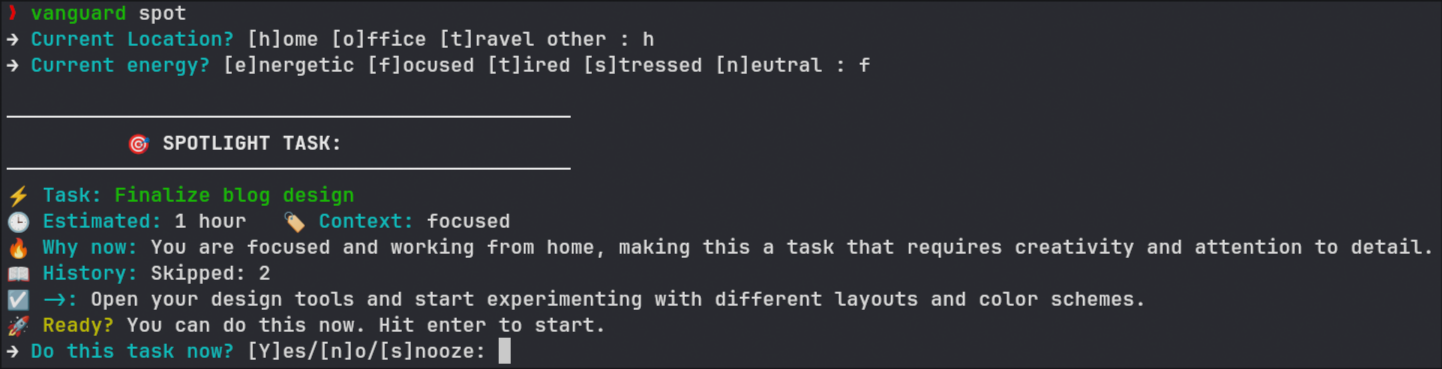
The LLM asks for your mood and context (home/office/travel), then reads your task list, tags, annotations, and urgency scores and picks one task. If you skip it, it tracks that. If you skip it multiple times, it offers to reframe it and invites you to reflect on it.
From knowing to doing
A task list is good to have.
But if I use one, what I need most is a tiny bit of momentum.
That is what most systems cannot help with. They might be great at storing and organizing tasks. But as far as I can tell, they do not help me cross the line from I should do this to I’m doing it now.
That is where better framing can help.
You’ve had “Fix onboarding flow” staring at you for weeks. Let’s reframe it, tag it, and point out that it’s blocking a launch milestone. Now it becomes:
“Refactor onboarding flow to reduce drop-off at step 3 (+sb). Start with reading feedback email — estimated 10 min.”
That’s a task you can start right now.
Or take the stale priority:H item:
task add Follow up with Sarah about Q2 projections +finance +email priority:H
That becomes:
“Send Sarah a quick email to confirm the Q2 forecast. It takes <10 min. Skipped twice already. Without it, budget approval stalls — hurting your raise prospects. Start by opening a new email and writing bullet points.”
That wording might be able to lower the friction of tackling the task just a tiny bit at the exact moment the friction matters most — right before beginning to work on it.
Closing
Whenever I tried getting back into the habit of lifting or running, the best way for me was to put my running shoes right in front of the bed the evening before, get up early, and do it first thing in the morning.
Before my mind wanders.
Before I get distracted by a “better” idea.
Before I give myself one more reason to start tomorrow instead.
Next time you’re staring at that “high priority” task from 19 days ago, it might help if the task comes back to you in a form that feels a little more doable than the one you originally dumped into your todo list.
For some of us, planning and doing need to stay clearly separated. Once it is time to act, thinking less is often better.
Building TaskVanguard was my own way of procrastinating on procrastination. Thanks, past-me. I guess?
If you want to try it, you just need an API key for OpenAI or DeepSeek, or access to a local LLM.
go install github.com/taskvanguard/taskvanguard/cmd/vanguard@latest
1400 Words
2025-06-10 08:00 (Last updated: 2026-04-05 21:53)